Recipients receive emails with an attachment winmail.dat which they cannot open.
This is caused by Microsoft Outlook composing emails in Rich Text Format (RTF), which allows you to format your email to include bold text, underlines, etc. Outlook automatically attaches a copy of the ‘Rich Text’ version of your email as winmail.dat to the plain text copy of your email.
Receiving email clients which do not understand ‘Rich Text’ emails, e.g. most email apps and devices other than Outlook, will show your email with a ‘winmail.dat’ file attachment.
Outlook will also package your other attachments, e.g. PDF and Word Docs into the winmail.dat file.
To avoid sending Winmail.dat attachments setup Outlook to compose and send emails in HTML or Plain Text.
Steps to prevent Winmail.dat attachments from being sent in Outlook
- Open Outlook.
- Click File, then click Options.

- Click Mail.
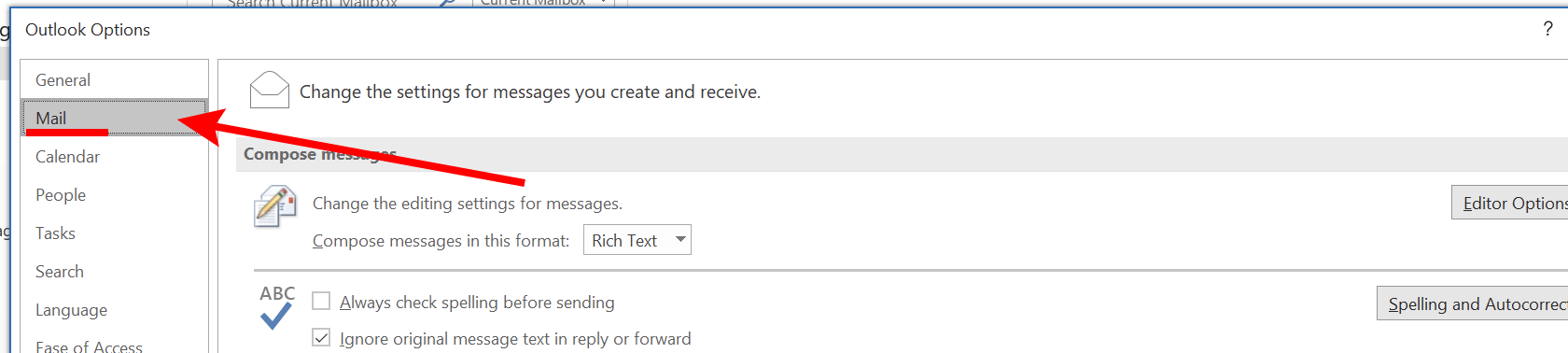
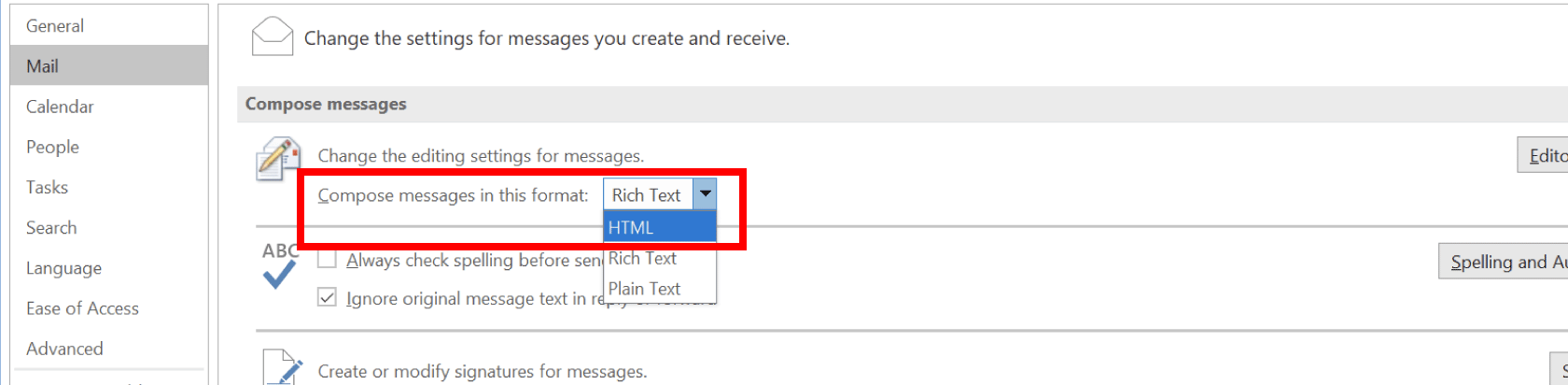
- Under Compose messages click the Compose messages in this format drop-down list. Select HTML.
- Scroll down in the option window til you find the Message format section. Click the When sending messages in Rich Text Format to Internet recipients drop-down list. Select Convert to HTML format.

- Click OK to save your changes.
