Email

Fix IMAP folder listing in Thunderbird

Problem

Thunderbird is not listing IMAP folders correctly.
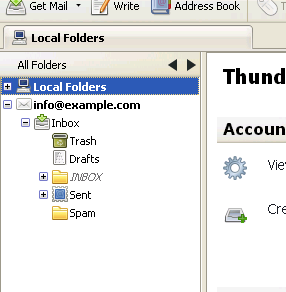
Grey Inbox IMAP folder in Thunderbird

Cause

The Thunderbird IMAP Server Directory needs to be updated in Thunderbird Settings.

Resolution

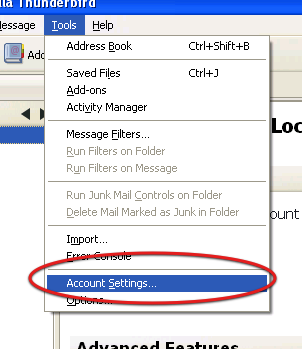
  • Click Tools > Account Settings
    Account Settings Tools Menu Thunderbird
    Click the Tools menu > Account Settings
  • Select your email account from left
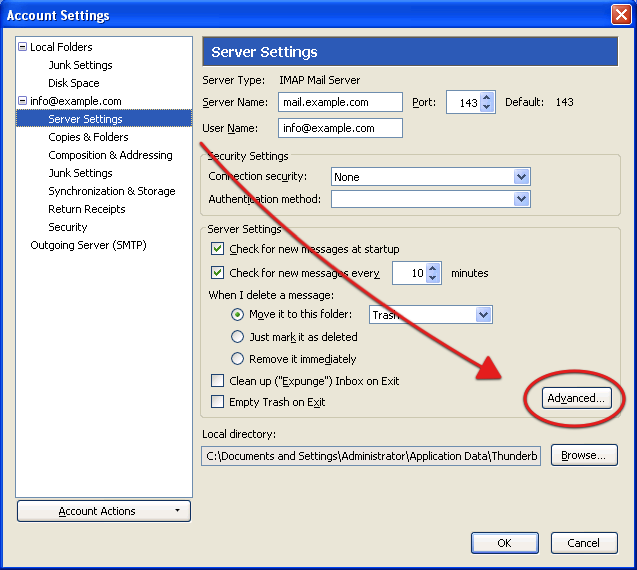
  • Click Server Settings
  • Click the Advanced button
    Advanced button Server Settings Thunderbird
    Click the Advanced Button under Server Settings for your account.
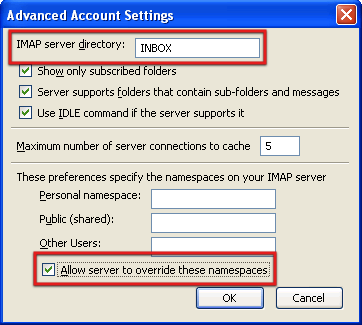
  • For IMAP server directory enter INBOX
    IMAP Server Directory Namespace Thunderbird
    Set IMAP Server Directory to INBOX
  • Tick Allow server to override these namespaces
  • Click OK
  • Close and restart Thunderbird for the change to take effect.

Was this guide helpful?

Need help with this?

Open a ticket and link to this guide so our team can see what you have tried.

View support tickets

Power your business with Ecenica Hosting

Built for WordPress and serious websites. Fast, secure and supported by real people in the UK.

Ecenica hosting services represented by a connected red route across London