How to install Freeway eCommerce

Search another help topic

What is Freeway eCommerce?

Freeway eCommerce is a free online store software that makes selling your services easy and quick. See What is Freeway eCommerce?.

How to install Freeway eCommerce

  1. Login to your Ecenica cPanel.
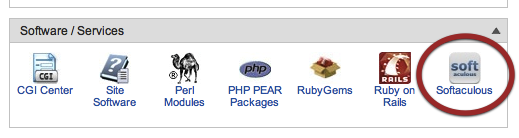
  2. Click Softaculous.

    Softaculous button in control panel
    Softaculous button in control panel
  3. Click on Freeway.

    Freeway-install
    Freeway-install
  4. Click ‘Install’ tab.

    Freeway-in-softaculous
    Freeway-in-softaculous
  5. Fill in your details, and click Install.

    Custom-settings-for-freeway

    Custom-settings-for-freeway

Need help with this?

Open a ticket and link to this guide so our team can see what you have tried.

View support tickets

Power your business with Ecenica Hosting

Built for WordPress and serious websites. Fast, secure and supported by real people in the UK.

Ecenica hosting services represented by a connected red route across London