Problem
When you send an email from Apple Mail on MacOS (Macbook, Macbook Pro, iMac, Mac mini) the following error can occur:
Cannot send message using the server info@example.com – The server response was: SMTP AUTH is required for message submission on port 587
Symptoms
- You are using Apple Mail on your Mac
- You cannot send emails
- Receiving emails works fine.
Causes
- Incorrect SMTP settings
Resolution
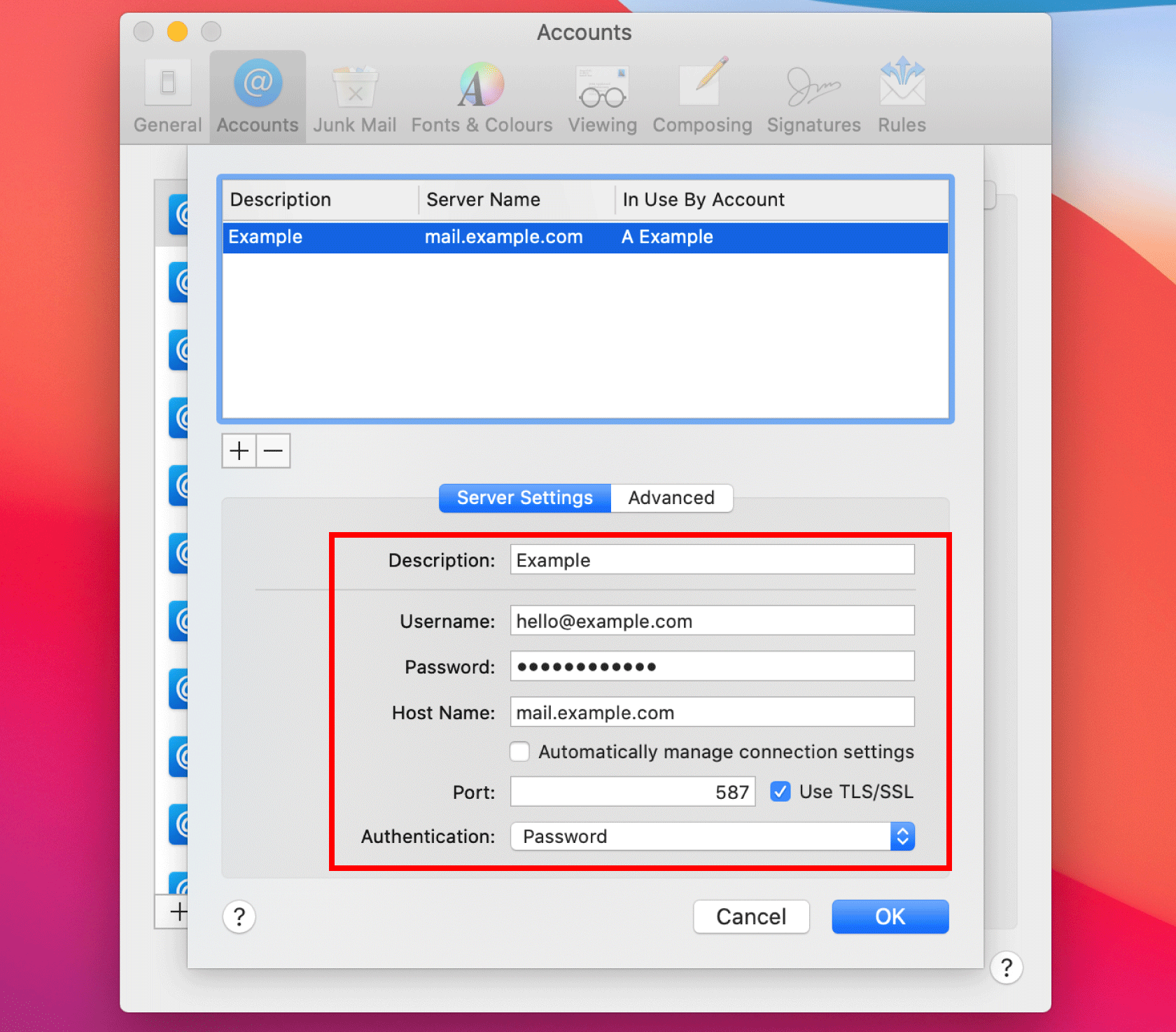
- Click Edit SMTP Server List on the error message.

- Uncheck Automatically manage connection settings.

- Check Port is set to 587 and Use TLS/SSL is checked.

- Click the Authentication drop-down list and select Password.

- Double-check your SMTP settings and then click OK.
- Username: Your Ecenica email address. E.g. info@example.com
- Password: Your email address password
- Host Name: mail.example.com, replacing example.com with your domain name.
- Port: 587
- Use TLS/SSL: Checked.
- Authentication: Password